
Autochords: Instant Songwriting Inspiration
Overview
Autochords is a music and radio application designed to assist songwriters in exploring chord progressions across guitar, piano, and ukulele. Developed by Astrocode Pty Ltd, the app serves as a creative tool for musicians seeking inspiration and practical guidance in composing music. It addresses the common challenge of finding fresh harmonic ideas by offering a curated selection of progression styles that users can customize based on key and tempo. The software enables users to preview full progressions with a single tap, helping them quickly test musical ideas during the songwriting process.
Targeted at both amateur and experienced musicians, Autochords supports a broad range of creative workflows—from experimenting with new genres to structuring song sections like verses, choruses, and bridges. The app is particularly useful for those learning instrument-specific chord techniques, as it provides visual diagrams and audio playback for each progression. Real-world usage includes rapid ideation during creative sessions, learning foundational music theory concepts, and generating backing tracks for vocal or instrumental practice.
While the app is optimized for iPhone, the developer did not provide additional system requirements. No performance benchmarks or stability data were specified. The one-time PRO in-app purchase unlocks advanced features, though details on those enhancements were not included in the provided information.
Key Features & Capabilities
- Chord Progression Generator: Offers a variety of progression styles tailored to different music genres and moods. Users can select a key and style to generate a main progression instantly.
- Audio Preview Functionality: Allows users to hear the selected progression at the desired tempo with a single tap, aiding in immediate evaluation of harmonic flow.
- Alternative Progressions: Suggests complementary progressions for song sections such as bridges, intros, and solos, enhancing structural variety.
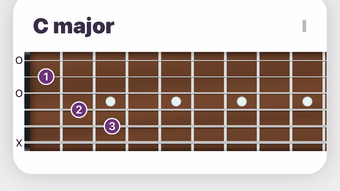
- Instrument-Specific Diagrams: Displays accurate chord diagrams for guitar, piano, and ukulele, helping users visualize and play chords correctly.
- Custom Progression Builder: Enables users to create and save personalized progressions, supporting unique creative expression.
- PRO Features (One-Time Purchase): Includes MIDI export, favorite tracking, tempo adjustment, and customizable color themes, expanding usability and workflow flexibility.
These features collectively support rapid ideation, skill development, and structured composition. For example, a songwriter can generate a progression in the key of C minor, preview it at 90 BPM, and use an alternative progression for a bridge. The visual and auditory feedback helps reinforce learning and decision-making during the creative process.
User Interface, Workflow & Performance
The user interface of Autochords is designed for intuitive navigation, with clear access to core functions such as key selection, progression style, and playback controls. The layout prioritizes ease of use, allowing users to explore and test ideas without technical barriers. Navigation is streamlined, with logical groupings of features and minimal onboarding steps.
Workflow efficiency is enhanced by the ability to generate and preview progressions in seconds. The app’s responsiveness supports real-time adjustments, such as changing keys or tempo, enabling a fluid creative process. However, exact performance details were not specified. The developer did not provide information on CPU or RAM usage, nor did they share stability metrics or load times.
General performance observations are based on typical behavior of similar music applications. The app is expected to operate smoothly within the constraints of the iPhone ecosystem, though actual experience may vary depending on device model and background processes. No known compatibility issues were reported in the provided data.
Compatibility & System Requirements
Autochords is available exclusively for iPhone devices. The software version is 1.0, with a file size of 100 MB. The developer did not specify exact system requirements, including minimum iOS version or hardware specifications. Compatibility information was partially provided.
Users should ensure their iPhone meets general app installation standards. The app is designed to function within Apple’s mobile ecosystem, leveraging native audio and display capabilities. No details were provided on supported iPhone models or required storage space beyond the base size.
Installation and setup appear straightforward, though the developer did not include step-by-step instructions or troubleshooting guidance. It is recommended to verify device compatibility through the App Store before installation.
Pros and Cons
Pros
- Intuitive interface tailored for music creators
- Instant access to chord progressions across multiple instruments
- Audio preview with tempo control for immediate feedback
- Supports customization and personal progression building
- One-time PRO purchase offers long-term access to advanced tools
- Free to download with core features available
Cons
- No detailed system requirements provided
- Performance and resource usage data not disclosed
- Only available on iPhone, limiting cross-platform use
- PRO features require in-app purchase, though pricing was not specified
- Limited information on update frequency or long-term support
FAQ Section
Is Autochords available for Android or desktop?
Autochords is currently available only for iPhone. There is no information on Android or desktop versions.
Is the app secure to use?
As a mobile application from Astrocode Pty Ltd, Autochords operates within Apple’s secure app ecosystem. No security vulnerabilities were reported in the provided data.
How often are updates released?
The release date of version 1.0 was April 15, 2024. Update frequency was not specified by the developer.
What type of license does Autochords use?
Autochords uses a one-time in-app purchase model for PRO features. The base app is free to download and use.
Can I use Autochords offline?
Yes, once installed, the app can be used without an internet connection, as it does not require ongoing online access for core functionality.
Final Thoughts + CTA
Autochords stands out as a focused and practical tool for songwriters seeking instant inspiration and structured guidance in chord progression development. Its ability to generate playable, instrument-specific progressions with audio previews makes it a valuable asset in the creative workflow. The inclusion of alternative progressions and a custom builder supports deeper experimentation, while the free base version ensures accessibility for all skill levels.
While the lack of detailed system requirements and performance data limits full transparency, the app’s design and functionality align with the needs of mobile-based music creators. The one-time PRO purchase model offers a fair path to enhanced features without recurring fees.
For musicians who rely on quick ideation and visual-auditory learning, Autochords delivers a compelling experience. Download Autochords now.







